
NBA Shot Charts - Part 1
sports-analytics
python
Create NBA Player Shot Charts with Python
Part 1
This post is the first in a series that demonstrate how to make shot charts by combining the Python module nba_api with the visualization modules matplotlib and seaborn.
Overview
- Background
- Data Collection
- Data Visualization
- Review
- References
Background
In 2012, at the \(6^{th}\) annual Sloan Sports Conference at MIT, geographer and basketball enthusiast Kirk Goldsberry unveiled the shot chart and revolutionized basketball analytics with his paper CourtVision: New Visual and Spatial Analytics for the NBA. Goldsberry’s shot chart (Figure 1, shown below) is a heatmap visual representation of the location, frequency, and accuracy of a player’s shot performance. The key intution behind shot charts is that spatial analytics provide more player insight than traditional boxscore numbers like field goal percentage. Shot charts provide insights into player tendencies (where they shoot, how successful), allow for comparison between players, and provide a a sense of what players complement each other based on location preferences/style of play. Goldsberry’s spatial analytics along with John Hollinger’s PER were part of the first wave of advanced analytics being introduced to basketball and represent the dawn of basketball’s “Moneyball” era where basketball front office’s started to seriously use advanced analytics in decision making.
NBA teams were so impressed by spatial analytics that the league partnered with SportVU and then Second Spectrum to track player movement for the entire league. Teams like the Los Angeles Clippers have invested even more in spatial analytics and have started to leverage artificial intelligence to analyze player and team performance. This post repurposes code from indivudual and collaborative work by Savvas Tjortjoglou and Bradley Fay, key contributors to Python’s py-Goldsberry module (created and maintained by Bradley Fay). See the References section for links to code by these authors
Data Collection
To make Goldsberry’s shot charts and use spatial analytics, we first need to get the player location data that is compiled by NBA partner Second Spectrum. The NBA makes this data available for consumption through an API (Application Programming Interface) and a group of Python developers created a module, nba_api, to leverage the NBA’s API. One of the API endpoints wrapped in the nba_api module is the Shot Chart endpoint. This endpoint provides a shotchartdetail DataFrame with the X and Y coordinates for all shots taken by a given player.
Gathering the Data
We can use the nba_api module to create databases of teams and players. Once we have these databases, we can filter along individuals or teams to make shot charts
there are 4723 in the players database and 30 in the teams databasethe players submodule from the nba_api module has a function, find_players_by_full_name, that we can use to get the player dictionary information for a given player. the function returns a list that we can take the first element from to create the player dictionary. let’s use the find_players_by_full_name function to filter the players submodule (a list of player dictionaries), for Kobe Bryant’s information and then explore the player dictionary
{'id': 977,
 'full_name': 'Kobe Bryant',
 'first_name': 'Kobe',
 'last_name': 'Bryant',
 'is_active': False}
similar to the find_players_by_full_name function from the players submodule, the teams submodule has a function find_teams_by_nickname that allows us to filter the teams submodule database of teams to get information on a team by using their nickanme. let’s use the find_teams_by_nickname to get information for Kobe’s lifelong team, the Los Angeles Lakers
{'id': 1610612747,
 'full_name': 'Los Angeles Lakers',
 'abbreviation': 'LAL',
 'nickname': 'Lakers',
 'city': 'Los Angeles',
 'state': 'California',
 'year_founded': 1948}
now we can use the id field from the player dictionary to get player location data. we’ll start out with a player location data for an entire year, but shot chart data can be gathered for an individual game. We’ll use Kobe Bryant’s player id (977) and team id (1610612747) to gather the location of all shots from two seasons in Kobe Bryant’s career: his 2007-2008 MVP season and final season in 2015-2016 with the shotchartdetail function. shotchartdetail makes a call to the shot chart endpoint with the parameters supplied in the function
Kobe’s 2007-2008 shot chart data from NBA API
Kobe’s 2015-2016 shot chart data from NBA API
in the next post, we’ll make a function to leverage the leaguegamefinder endpoint to get individual game ids for shot chart creation on the game-level instead of the season-lvel. right now, let’s examine the data provided by the shot chart endpoint. The dictionary from the API response has three keys, and the X and Y coordinate data is in the resultSets dictionary
dict_keys(['resource', 'parameters', 'resultSets'])in the resultsSets dictionary we see the fields LOC_X and LOC_Y which are the X and Y coordinates of the player’s shot
['GRID_TYPE',
 'GAME_ID',
 'GAME_EVENT_ID',
 'PLAYER_ID',
 'PLAYER_NAME',
 'TEAM_ID',
 'TEAM_NAME',
 'PERIOD',
 'MINUTES_REMAINING',
 'SECONDS_REMAINING',
 'EVENT_TYPE',
 'ACTION_TYPE',
 'SHOT_TYPE',
 'SHOT_ZONE_BASIC',
 'SHOT_ZONE_AREA',
 'SHOT_ZONE_RANGE',
 'SHOT_DISTANCE',
 'LOC_X',
 'LOC_Y',
 'SHOT_ATTEMPTED_FLAG',
 'SHOT_MADE_FLAG',
 'GAME_DATE',
 'HTM',
 'VTM']
we can convert the resultSets dictionary into a DataFrame to aid in analysis
| GRID_TYPE | GAME_ID | GAME_EVENT_ID | PLAYER_ID | PLAYER_NAME | TEAM_ID | TEAM_NAME | PERIOD | MINUTES_REMAINING | SECONDS_REMAINING | EVENT_TYPE | ACTION_TYPE | SHOT_TYPE | SHOT_ZONE_BASIC | SHOT_ZONE_AREA | SHOT_ZONE_RANGE | SHOT_DISTANCE | LOC_X | LOC_Y | SHOT_ATTEMPTED_FLAG | SHOT_MADE_FLAG | GAME_DATE | HTM | VTM | |
|---|---|---|---|---|---|---|---|---|---|---|---|---|---|---|---|---|---|---|---|---|---|---|---|---|
| 0 | Shot Chart Detail | 0020700002 | 4 | 977 | Kobe Bryant | 1610612747 | Los Angeles Lakers | 1 | 11 | 29 | Missed Shot | Jump Shot | 2PT Field Goal | Mid-Range | Center(C) | 16-24 ft. | 21 | 54 | 209 | 1 | 0 | 20071030 | LAL | HOU |
| 1 | Shot Chart Detail | 0020700002 | 19 | 977 | Kobe Bryant | 1610612747 | Los Angeles Lakers | 1 | 9 | 19 | Missed Shot | Layup Shot | 2PT Field Goal | Restricted Area | Center(C) | Less Than 8 ft. | 0 | 0 | 0 | 1 | 0 | 20071030 | LAL | HOU |
| 2 | Shot Chart Detail | 0020700002 | 23 | 977 | Kobe Bryant | 1610612747 | Los Angeles Lakers | 1 | 9 | 1 | Made Shot | Layup Shot | 2PT Field Goal | Restricted Area | Center(C) | Less Than 8 ft. | 0 | 0 | 0 | 1 | 1 | 20071030 | LAL | HOU |
| 3 | Shot Chart Detail | 0020700002 | 31 | 977 | Kobe Bryant | 1610612747 | Los Angeles Lakers | 1 | 7 | 56 | Made Shot | Jump Shot | 2PT Field Goal | Mid-Range | Center(C) | 16-24 ft. | 20 | 51 | 201 | 1 | 1 | 20071030 | LAL | HOU |
| 4 | Shot Chart Detail | 0020700002 | 48 | 977 | Kobe Bryant | 1610612747 | Los Angeles Lakers | 1 | 6 | 6 | Missed Shot | Jump Shot | 3PT Field Goal | Above the Break 3 | Right Side Center(RC) | 24+ ft. | 26 | 121 | 237 | 1 | 0 | 20071030 | LAL | HOU |
get_shots_df_by_seasoncollapses the last few lines of code into a function to create a shot dataframe. the function takes the following parametersteam_dictplayer_dictseason
- let’s get kobe’s rookie season shot dataframe with this functon
| GRID_TYPE | GAME_ID | GAME_EVENT_ID | PLAYER_ID | PLAYER_NAME | TEAM_ID | TEAM_NAME | PERIOD | MINUTES_REMAINING | SECONDS_REMAINING | ... | SHOT_ZONE_AREA | SHOT_ZONE_RANGE | SHOT_DISTANCE | LOC_X | LOC_Y | SHOT_ATTEMPTED_FLAG | SHOT_MADE_FLAG | GAME_DATE | HTM | VTM | |
|---|---|---|---|---|---|---|---|---|---|---|---|---|---|---|---|---|---|---|---|---|---|
| 0 | Shot Chart Detail | 0029600027 | 102 | 977 | Kobe Bryant | 1610612747 | Los Angeles Lakers | 1 | 0 | 42 | ... | Left Side Center(LC) | 16-24 ft. | 18 | -140 | 116 | 1 | 0 | 19961103 | LAL | MIN |
| 1 | Shot Chart Detail | 0029600031 | 127 | 977 | Kobe Bryant | 1610612747 | Los Angeles Lakers | 2 | 10 | 8 | ... | Left Side Center(LC) | 16-24 ft. | 16 | -131 | 97 | 1 | 0 | 19961105 | NYK | LAL |
| 2 | Shot Chart Detail | 0029600044 | 124 | 977 | Kobe Bryant | 1610612747 | Los Angeles Lakers | 2 | 8 | 37 | ... | Left Side Center(LC) | 16-24 ft. | 23 | -142 | 181 | 1 | 1 | 19961106 | CHH | LAL |
| 3 | Shot Chart Detail | 0029600044 | 144 | 977 | Kobe Bryant | 1610612747 | Los Angeles Lakers | 2 | 6 | 34 | ... | Center(C) | Less Than 8 ft. | 0 | 0 | 0 | 1 | 0 | 19961106 | CHH | LAL |
| 4 | Shot Chart Detail | 0029600044 | 151 | 977 | Kobe Bryant | 1610612747 | Los Angeles Lakers | 2 | 5 | 27 | ... | Center(C) | 8-16 ft. | 13 | -10 | 138 | 1 | 1 | 19961106 | CHH | LAL |
5 rows × 24 columns
- let’s create a function to get summary statistics so we can compare Kobe’s three seasons. the
shots_df_summary_statsfunction will return:- total shots
- made shots
- missed shots
- field goal percentage
in 1996 Kobe attempted 422 shots and made 176, missing 246
in 2008 Kobe attempted 1690 shots and made 775, missing 915
in 2016 Kobe attempted 1113 shots and made 398, missing 715
Kobe's shooting percentage was 45.86% compared to 35.76% in 2016 and 41.71% in 1996
Data Visualization
To create our V1 shot chart, we need: 1. a scatter plot of player shots 2. a basketball court overlayed onto the scatter plot to understand where on the court shots were taken.
We can achieve these two goals by combining and matplotlib and seaborn, two powerful Python visualization libraries. matplotlib is a powerful visualization library capable of producing 2D, 3D, and interactive visualizations. seaborn is based on matplotlib and allows for high-level visualizations that incorporate statistics. Lastly, I use code from Bradley Fay to create an NBA court, Fay’s function draws all aspects of an NBA (half)court including the restricted area, free throw line, and three point line.
First, let’s create a scatter plot of Kobe’s shots from 2007 to 2008 and color his missed shots red and made shots green
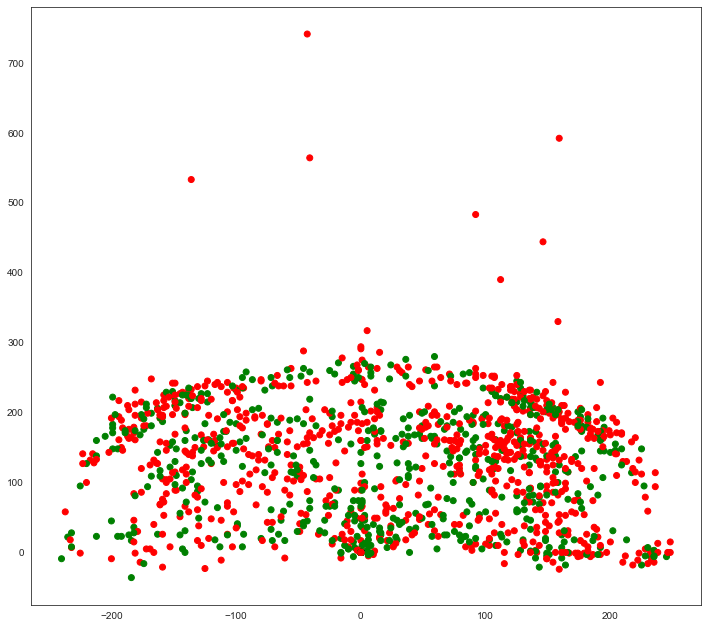
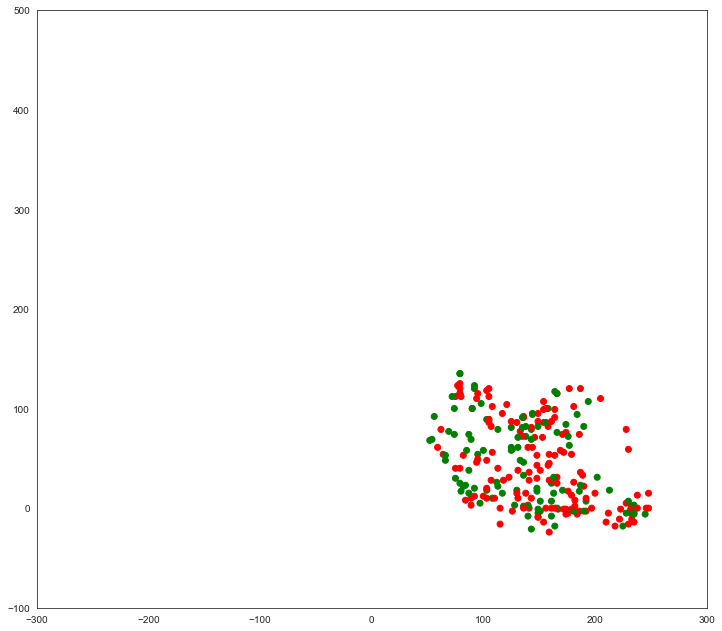
Note: The plot above represents an inversion of the data where the x-axis values are not on the correct side of the court. We can plot only shots in the “Right Side(R)” shot zone area to see the inversion. The plot below demonstrates how shots categorized as taken from the “Right Side(R)”, while to the viewers right, are actually to the left side of the hoop. This is something we will need to fix when creating our final shot chart.
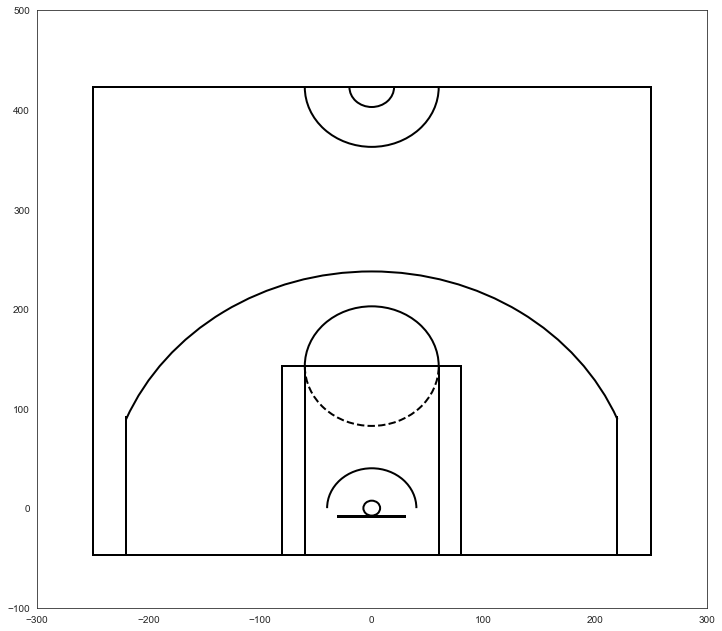
To draw our court, we can roughly estimate that the center of the hoop is at the origin (0,0) of the Cartesian grid. We can also estimate that every 10 units on either the X and Y axes represents one foot. We can verify this by just look at observations in our shot_chart DataFrame. The shot range for the first shot is characerized as “Less Than 8 ft.”, the shot appears to be taken at the basket with the LOC_Y equal to 0. The second shot is categorized as “16-24 ft.” and the LOC_Y value is 201 suggested that every ten units equats to one feet (the shot appears to be taken 20 feet from the basket).
The dimensions of a basketball court can be seen here
Faye used the court dimensions along with matplotlib objects such as Circle, Rectangle, and Arc objects to draw our court. The function draw_court encapsualtes all the court spatial knowledge and visual represenations
our next step is to overlay the scatter plot of shot location on the NBA court. when we overlay the NBA court, we can see that the furthest shots Kobe attempted were beyond half court and likely desperation heaves at the end of the quarter (we can confirm by inspecting further)
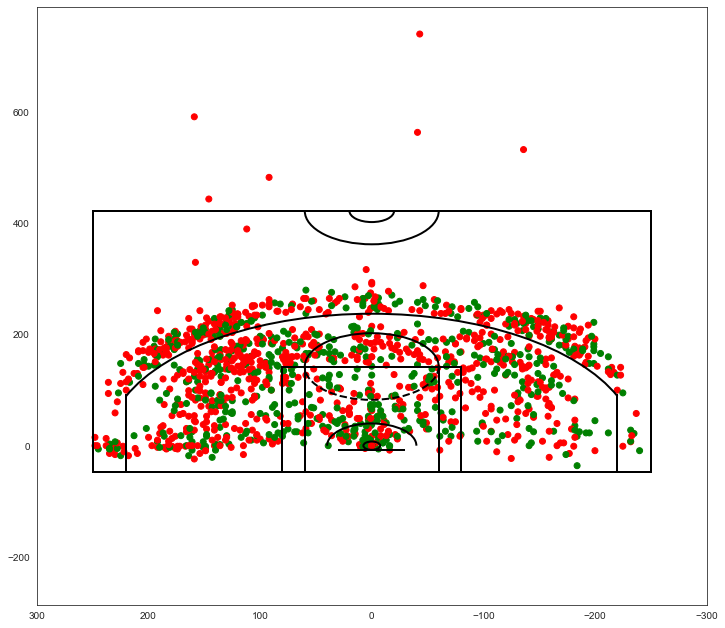
Lets orient our shot chart with the hoop by the top of the chart, which is the same orientation as the shot charts on stats.nba.com. We do this by settting descending y-values from the bottom to the top of the y-axis. When we do this we no longer need to adjust the x-values of our plot.
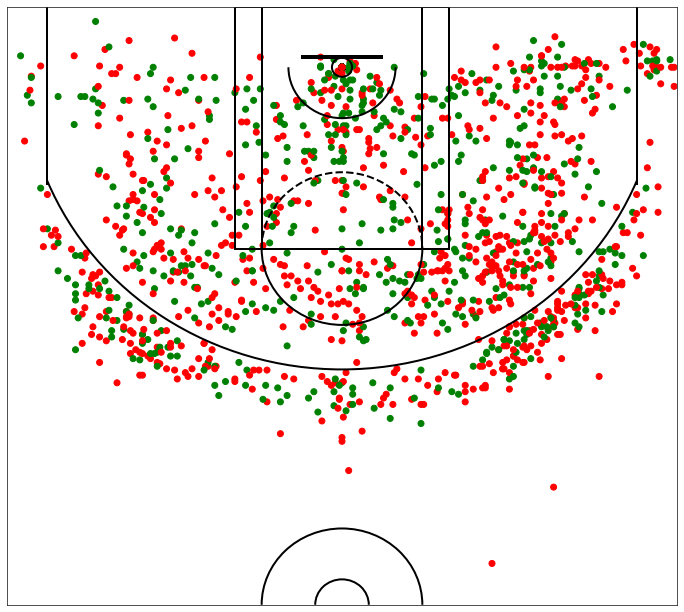
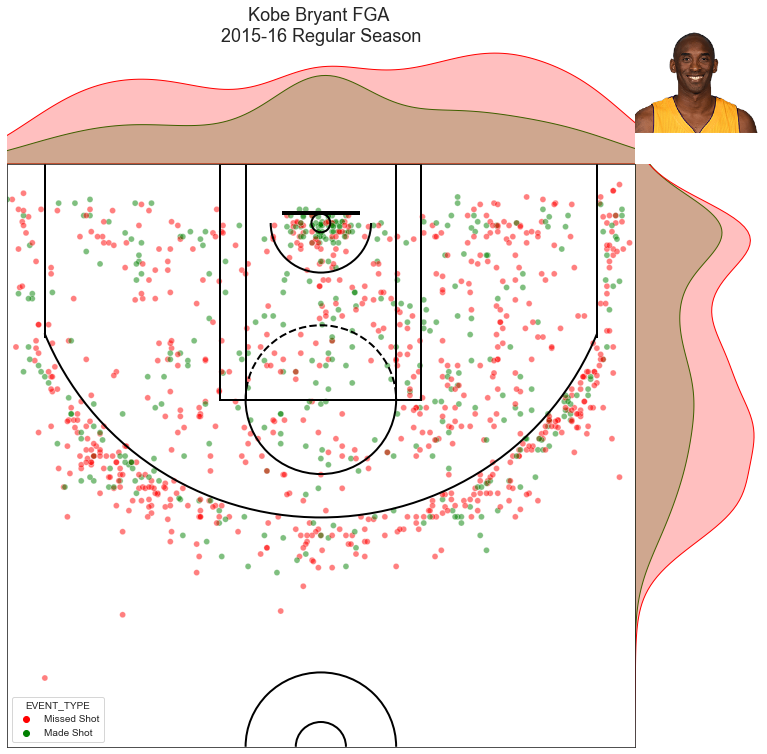
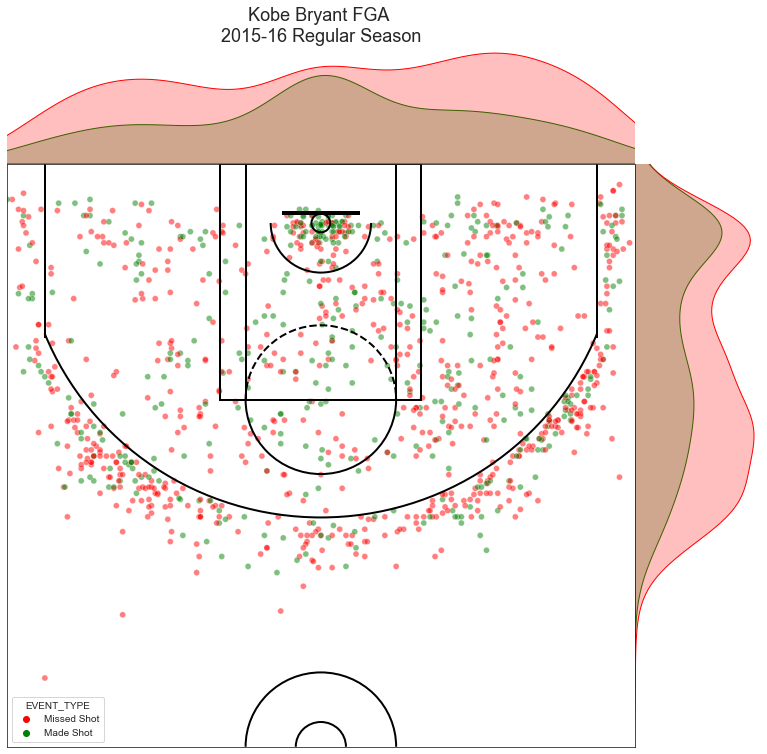
Lets start creating a version 1 of Goldsberry’s shot charts using the jointplot function from seaborn. jointplot adds a frequency dimension to the shot locations and is the first step to adding spatial analytics to our shot chart
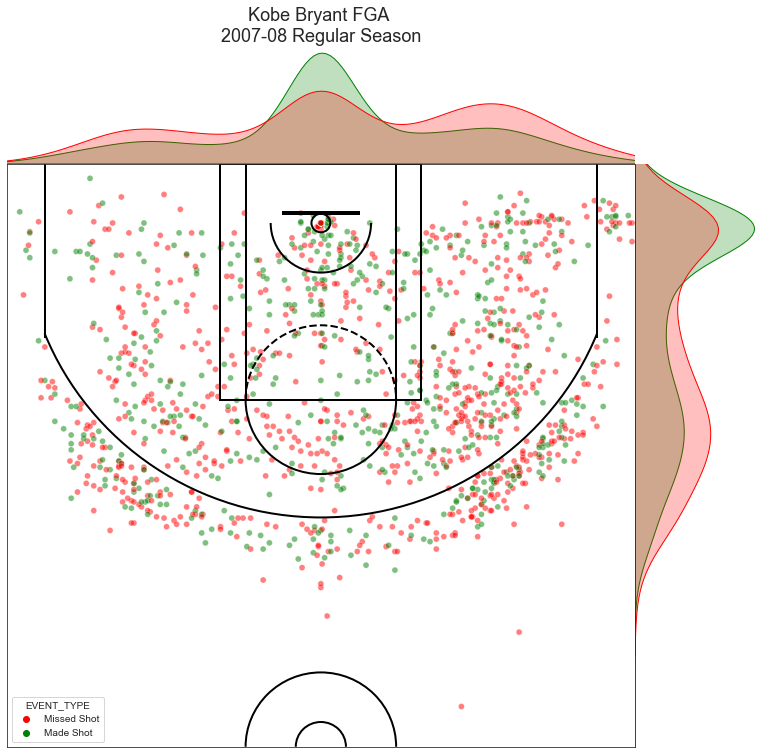
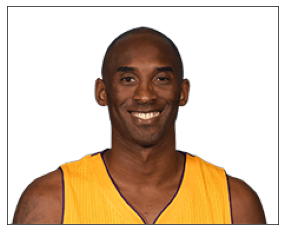
we can further customize this V1 shot chart by adding an image of the player, using the player id that we first retrieved from the NBA player database, we can use the get_player_pic function to retrieve a player’s pic from the nba.com
now let’s add our player image to the V1 of the shot chart
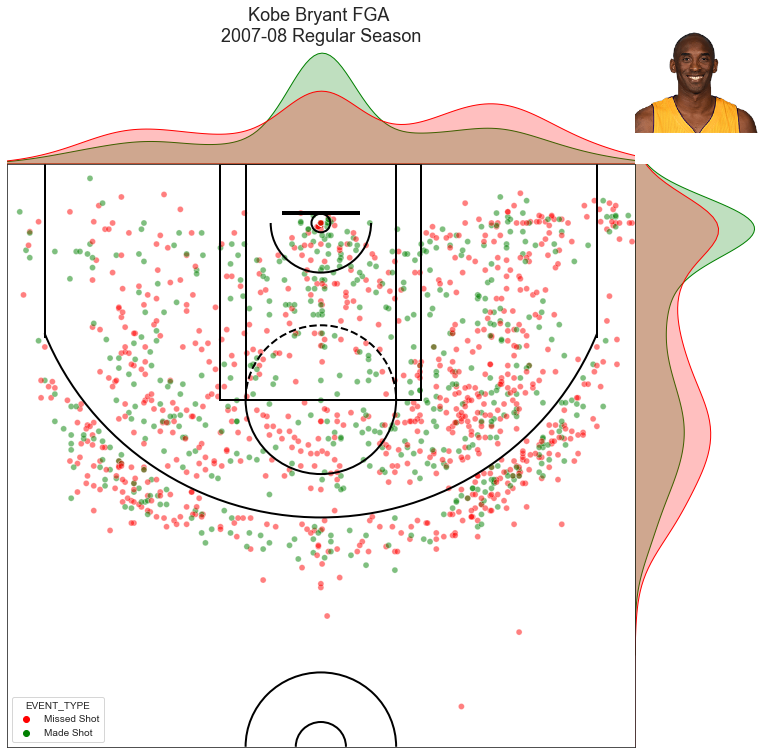
- the function
create_joint_shot_chartwraps the previous code into a function with the inputs for- shot dataframe
- plot title
- picture dictionary: optional, defaults to empty dictionary
- otherwise enter dictionary with keys for include_pic and player_pic
- let’s create a
jointplotfor Kobe’s 2016 season using thecreate_joint_shot_chartand compare with his 2008 season.
- we can remove Kobe’s picture by dropping the optional argument for the player’s picture dictionary
Review
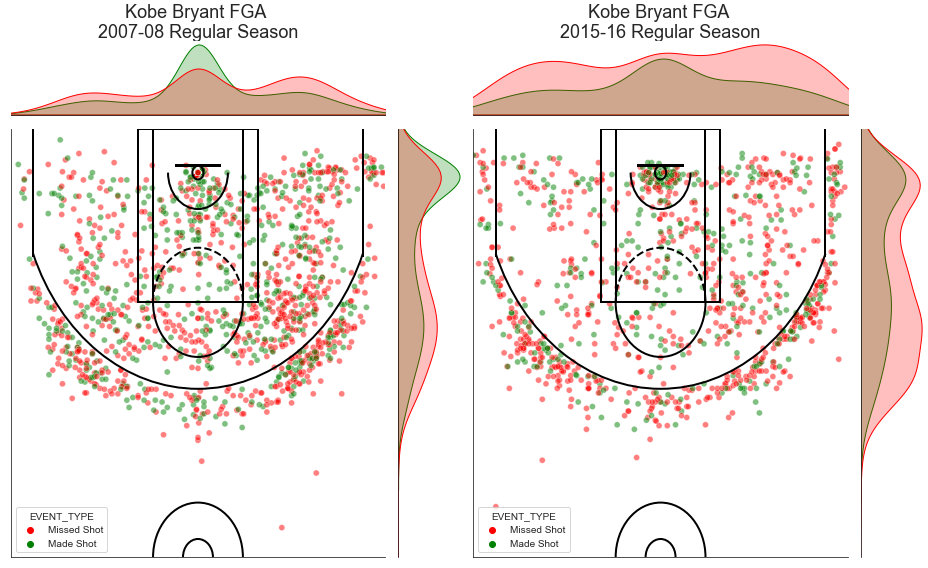
Some interesting takeaways from the histograms provided by the jointplot function. Looking at the side-by-side plot of Kobe’s shooting performance (below) * we can see the frequency and efficiency that Kobe attacked the restricted area in his MVP season. + Kobe made more field goals than he missed from 0-4 ft from the basket, a feat usually reserved for NBA “bigs” (individuals playing the Center or Power Forward possition) * conversely, we see the decline in Kobe’s efficiency his final year where there was no area where he made more field goals than he missed
* Kobe also shot more from the right side of the court than the left, not surprising for a right-handed player * the incredible spread and verstality in shot selection, Kobe shot from everywhere in both years shown + V2 of the shot chart will let us know how efficiently he shot relative to other areas on the court
In Part 2 of this series, we will modularize aspects of this notebook including getting shot chart data and begin applying Goldsberry’s spatial analytics contributions
originally published 2022-02-27 16:20:00
last updated: 2022-03-01 17:54:18

Python version: sys.version_info(major=3, minor=9, micro=7, releaselevel='final', serial=0)
matplotlib version: 3.4.3
iPython version: 7.29.0
urllib version: 3.9
seaborn version: 0.11.2
pandas version: 1.4.1
References
- http://savvastjortjoglou.com/nba-shot-sharts.html
- https://github.com/bradleyfay/py-Goldsberry/